Co-working salons & salon suites
Co-working salon software with one front door and separate books.
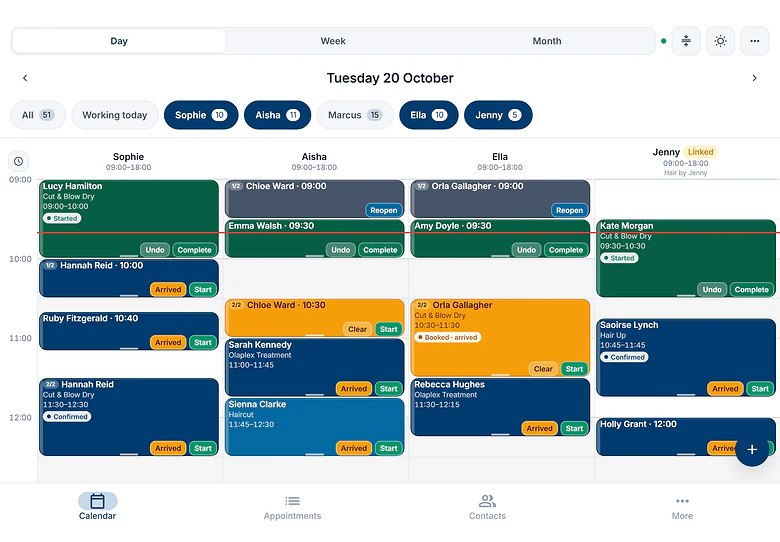
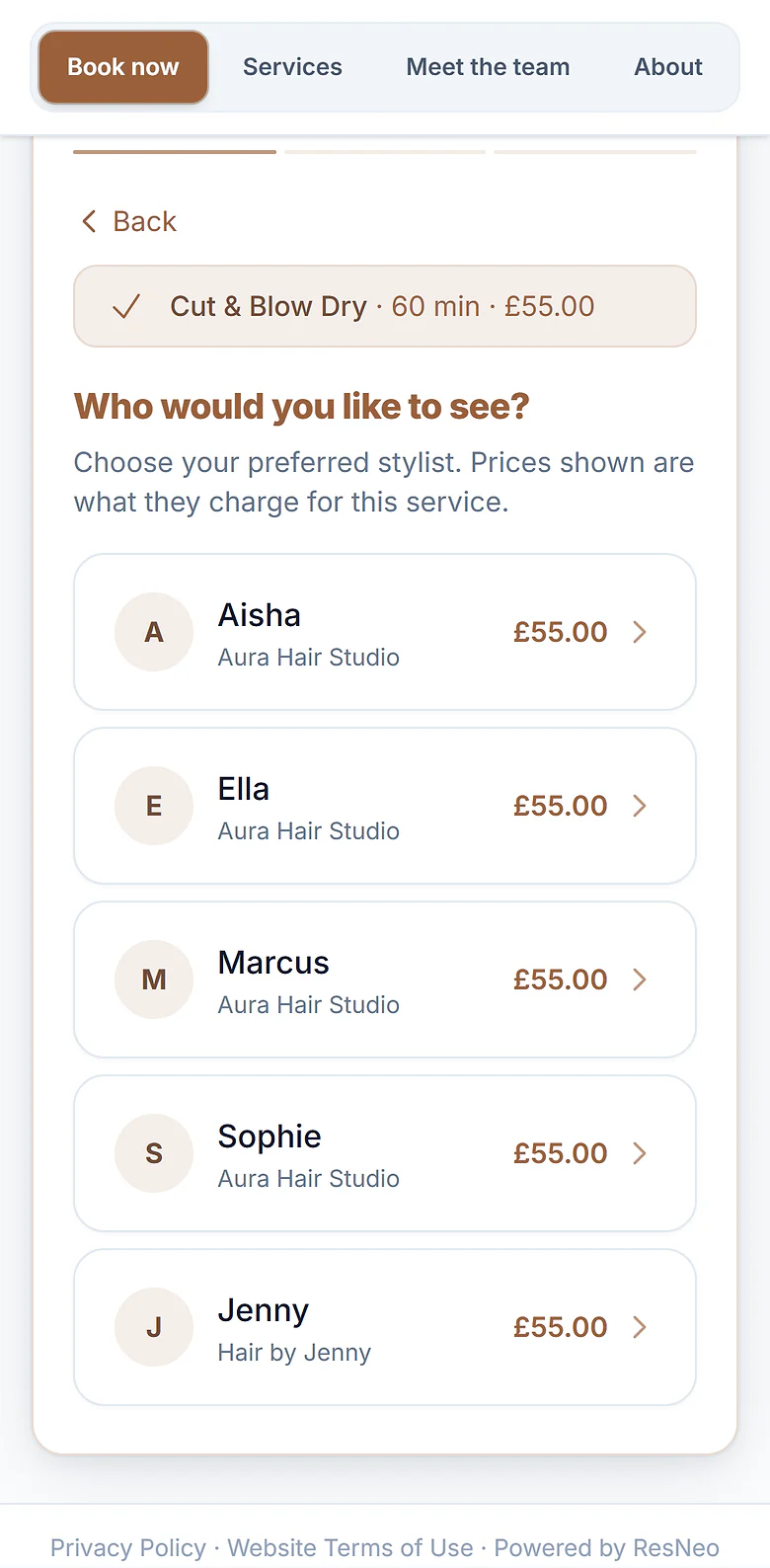
One building and one booking page for your clients. Behind it, every stylist, barber, nail tech and therapist runs their own business, with their own account, diary, clients and payments. You run the page. They run their books.
- One booking page for the building
- Every member keeps their own books
- No booking commission
The short answer
What is co-working salon software?
Co-working salon software gives a building of self-employed stylists, barbers and therapists one booking page, while every member keeps their own account, diary, clients and payments. On ResNeo each member has their own account and plan (most need Appointments Light at £20 a month), linking costs nothing, and the operator hosts the page under the building's name. Each booking, client record and payment belongs to the member who was booked. Everyone on the page can see each other's bookings, client contact details and booked revenue, and treatment records where a member switches them on.
How it works
How a co-working salon works on ResNeo
Clients see one place to book. Behind the page, every member is their own business with their own ResNeo account.
This page is for buildings where every chair, room or suite is let to an independent. Run your own salon team and let a few chairs on the side? Chair rental salon software fits better.
What the operator controls
Your account hosts the combined booking page. In ResNeo that business is called the host.
- Which services are on the page, with their names, descriptions, options and forms. Members' other services are parked while it is live
- The name clients see: yours, or under Settings, Booking Page, Name on your booking page, choose A different name for the building’s brand
- The page's look and web address, with embed code for your website and a QR code for the desk
- Who joins: invite a member, remove one, or hand hosting to another member
- Whether members set their own prices and times for each service
- Five shared booking settings, such as Appointment waitlist and Staff-first booking
A group of equals? One of you still hosts
The host holds the menu, the shared settings and the price lock, so agree in writing how you will decide them. Ask to host hands hosting over 14 days after the other business accepts, and A different name puts your shared brand on the page instead of the host’s name.
What every member keeps
Each member signs up for their own ResNeo account and plan. Joining your page shares access. It never moves ownership.
- Their own diary, hours and days off. The page only offers a member when their own diary says they are free
- Their own clients and history. A client who books two members has a separate record with each
- Payments to their own Stripe account, after clients see You are booking with their business. ResNeo does not hold booking money (more on separate payments)
- Confirmations and reminders from their own business, using their own text message allowance
- Their own price, length, buffer and deposit for each service on the page, unless you lock it
What changes when they join: their own booking page rests and sends guests to yours, their services that are not on the page are parked, the host’s five booking settings replace theirs, and they must offer appointments in the same time zone and currency as you.
Who sets prices in a co-working salon or suite building?
You build the menu. Each member can set their own prices and times on it, unless you lock a service.
You choose the services and their standard price, length and deposit. A member then sets their own calendar’s price, length, buffer and deposit with Edit values in Manage Collective. Every service starts that way, which suits businesses that each decide what they charge, as HMRC’s guidance for hair and beauty describes self-employed people working (our guide to chair rental and HMRC employment status explains why that matters).
To fix them for one service, such as a consultation priced the same everywhere, click a member’s box in the Manage Collective grid and click Lock prices and times. The row reads Prices and times locked, and Let members set their own undoes it. On a service with options, each option has one price everywhere, and only the deposit can differ. Where members’ prices differ, clients choose the person first, because Any available cannot quote one price.
What members can see of each other
Be clear about this before anyone joins: everyone on a combined page can see each other’s bookings, client contact details and booked revenue, and treatment records where a member switches them on.
Joining links a member with every other business on the page at Work as one team, both ways, so anyone can book, move or cover a booking in any member’s diary. Each member agrees to this when they join, and every action across a link goes in an audit log both sides can see.
Treatment records too. If a member keeps treatment records in ResNeo (notes, allergies, before and after photos), every other member’s admins and team members with a diary can see and add to them, and ResNeo says so when the member switches records on. Beauty, aesthetics and massage members who keep medical histories may prefer linked diaries instead.
Each member is sharing their clients’ details with every other business on the page, so agree in writing how they may be used, and check the ICO’s data sharing code. A member should not email another member’s clients: the ICO’s guidance on electronic mail marketing says the soft opt-in only covers a business’s own products and services.
Reports follow the same rule: while members are on the page, everyone sees each business’s Booked revenue in its own row, and the bookings list has a Booked through filter. Takings and sales stay with each business unless a member agrees a commission split that includes products.
Rather not share? Skip the combined page and link diaries at See each other’s diaries, which shows calendars with no client names or contact details. Members keep their own booking pages, and your website links to each one.
Your front desk
Many buildings run a shared reception. In the UK, HMRC’s VAT manual accepts that a salon can provide reception and appointment booking to self-employed members as an agreed service. Check one thing with your accountant first: a suite let to a hairdresser on its own may be exempt from VAT, but a chair or suite that comes with reception or booking can be standard-rated (our guide explains).
Give your receptionist a Front desk login on your account (logins are unlimited on every plan). On a combined page they can book, move and cancel in every member’s column, and each client is saved with the member who was booked. See roles and permissions.
Want your desk to book for everyone while members cannot see each other’s clients? Skip the combined page and link each member with your account only. In each link request, choose Customise permissions, ask for Full booking detail and Create, edit and cancel bookings on the member’s calendars, and give them No access to yours. Because the link is not full both ways, it never shares treatment records. The trade-off: no single booking page.
What your clients see
- Your address, phone and opening hours at the top of the page. If members work at other addresses, an Our locations list shows each one
- Before paying, You are booking with the member’s business, and Your payment goes to that business
- A confirmation from the member's business, naming the page they booked through
- A marketing tick box that names the member's business, not the building
- A member's own link still works: from their Instagram bio it opens your page with their team listed first
- One visit across members: a client can book a cut with one member and nails with another in one visit, as long as each member's address in ResNeo has the building's postcode. Each business provides, charges for and refunds its own part, and the client gets one confirmation
- If you switch on Any available practitioner, clients can take the first free time with anyone who offers that service at the same price, and busy times are shared out so one member does not get them all
Combined page, linked diaries or one account: which suits your building?
There are three ways to run a shared building on ResNeo. The right one depends on whether your members run their own businesses, and how much they want to share.
| Combined booking page | Linked diaries, own pages | One account with staff logins | |
|---|---|---|---|
| What clients see | Combined pageOne page under your name or a name you choose, with every member on it | Linked diariesEach member's own booking page. Your website can link to each one | One accountYour booking page, with each person shown as part of your team |
| Accounts and plans | Combined pageEvery member has their own account and plan. Linking costs nothing | Linked diariesEvery member has their own account and plan. Linking costs nothing | One accountOne account and one plan, yours. Plus covers up to 5 calendars, Pro has no limit |
| Who sets services and prices | Combined pageYou build the menu. Members set their own price, length, buffer and deposit unless you lock a service | Linked diariesEach member, on their own page | One accountYou, for everyone |
| What members see of each other | Combined pageEach other's bookings, client contact details and booked revenue, and treatment records where switched on | Linked diariesAt the first level, diaries only, with no client names. More only if both agree | One accountWhatever you allow each person. Owners and admins see everything |
| Where payments go | Combined pageEach member's own Stripe account | Linked diariesEach member's own Stripe account | One accountYour Stripe account |
| Whose clients they are | Combined pageThe member who was booked | Linked diariesThe member who was booked | One accountYour business's |
| When someone leaves | Combined pageLeave, then Unlink on each of their links. They keep everything | Linked diariesUnlink. They keep everything | One accountTheir clients and history stay in your account |
| Best for | Combined pageBuildings that want one brand and one link | Linked diariesMembers who want their own page and more privacy | One accountSalons where the team are employees |
About one account with staff logins
You can set Other people’s diaries to Hidden and switch off Can see client phone numbers and emails for each person, but these are working-view settings, not a lock on your data. Every client record and payment still sits with you, not with the member.
Can ResNeo work out members’ rent?
No, ResNeo never collects rent. If you charge a percentage, Commission splits can work out what each member owes you each week or month. It needs a Work as one team link or a shared booking page, which every member of a combined page already has. A fixed rent you keep invoicing as you do now.
Under Settings, Commission splits, click Set up a split on a member’s calendar. Agree a share of the services they complete (and, if they use ResNeo’s Checkout, products), call it Rent or Fee, and settle weekly or monthly. Nothing counts until the member accepts. Each period gets a statement you both see, with Mark as paid. See the commission splits guide, and for what to charge, how to start a co-working salon.
Treatment rooms and suites: what to set up
A member’s client appointment never reserves a room, and rooms never block across separate businesses. Plan your rooms around that.
- 1
One member, one room or suite
In a suite, or a room let to one person, the member's own calendar is the room. Nobody else books into it, so nothing clashes.
- 2
Rooms you let by the hour
Add them to your own account as room hire, and book members in or list the rooms on your page. Two room hires never overlap. A member's client appointment does not reserve the room, so they book both. Each room sits on one of your calendars and blocks it while open, and rooms open at the same time need a calendar each: four studios open together need Plus.
- 3
A rota for everything else
If members float between rooms, agree a rota, or give each room to one member on set days.
A room itself does not count towards your calendar limit, but the calendar it sits on does, so on Light a room takes your one calendar during its open hours. See bookable rooms and their hours.
When a member leaves, or a new one joins
- 1
They leave the page
In Settings, Linked Accounts, they click Leave on the page’s row, and their own booking page comes back with every service, calendar and booking. You can do it for them with Remove on the Venues tab of Manage Collective.
- 2
They unlink from each business
Leaving, or Remove, keeps every link. Joining linked them with every business on the page, so each link stays until they click Unlink on it, one per business. Until then, they and the others still see each other’s bookings and clients.
- 3
Their clients were always theirs
Their records, future bookings and Stripe account were in their own account all along, so there is nothing to export or divide.
- 4
New members join in one step
On the Venues tab, click Invite a venue. When they accept, they are linked with every business on the page and join it.
The page needs at least two businesses, so it ends when the last member leaves, or when you choose End the collective.
Setting up a co-working salon on ResNeo
These are the words you will see on screen.
- 1
Everyone signs up
You and each member sign up for your own account and plan, each with a free trial, and set up your own calendar and services. Already on another booking system? Send us your export and we’ll move your clients, future bookings and team across for free. Then check everything before you share your new link.
- 2
Link with your first member and start the page
Open Settings, then Linked Accounts, and click Link with a venue. Find the member, choose Work as one team, then Also start a collective. Name it, pick its web address and click Send request.
- 3
They accept
They click Review request on the notice in their dashboard, read what joining means, then click Accept and join, followed by the page’s name.
- 4
Choose the services and go live
Click Continue setup on your dashboard. Under Which services go on the page? tick the services, and under Who does what? the calendars that offer them, clicking Save and continue as you go. The last step shows whether the page is live.
- 5
Give the page the building's name
Open Settings, then Booking Page. Under Name on your booking page, keep your own business name or choose A different name.
- 6
Invite everyone else
In Manage Collective, on the Venues tab, click Invite a venue for each member. Nobody has to collect links first: one invitation links and joins.
Step by step in the help centre: linking with another business and running a combined booking page. The Link & Break page has the whole picture.
What co-working salon software costs
Each business pays for its own plan, and linking costs nothing on top. A member working one chair, room or suite usually needs Appointments Light at £20 a month.
Not working in the building yourself? You still need an account to host the page. Members’ calendars never count against your limit, so Light is enough unless you let rooms by the hour as well: each room open at the same time needs its own calendar, and on Light a room takes your one calendar while it is open. Text messages for a booking use the member’s own allowance. There is no booking commission on any plan. Standard payment provider fees may apply.
Prices are in pounds sterling and include VAT. If your business is in Ireland, talk to us before you take card payments online: online payments in euros are not switched on yet. To compare costs, try the booking software calculator, or see every plan and fee.
The three plans, for you and for each member.
Appointments Light
£20a month
One person, one calendar
Appointments Plus
£49a month
Up to 5 bookable calendars, with unlimited team logins
Appointments Pro
£99a month
Unlimited calendars and logins
Prices include VAT. Every plan includes unlimited team logins, online booking, deposits, reminders, client records and the iOS and Android apps, and starts with a 14-day free trial. Cancel anytime. Your subscription stays active until the end of your current billing period, and you are not charged again after that. If you cancel during your free trial, you pay nothing. See every plan and fee in full.
Opening or converting a building?
Our guide on how to start a co-working salon covers the models, what to charge, the paperwork in the UK and Ireland, and the mistakes to avoid. No booking system settles anyone’s employment status or replaces a written agreement with each member, so take advice before members move in.
Common questions
Co-working salon software, answered.
What is the best booking system for a co-working salon or salon suites?
One where every member has their own account, not a login on yours, so their diary, clients and payments stay theirs, while the building still has one booking page. On ResNeo the accounts link and you host that page.
Can a salon suite building have one booking page for every suite?
Yes. Once each suite holder has their own ResNeo account linked to yours, you host one combined booking page. Clients choose the person they want, the booking lands in that person's own diary, and any payment goes to their own Stripe account.
Does every co-working salon member need their own ResNeo plan?
Yes. Each business has its own account and plan, which is what keeps their clients and money separate. A member working one chair, room or suite usually needs Appointments Light at £20 a month. Linking costs nothing, and members' calendars never count against your plan.
Can co-working salon members see each other's clients?
On a combined booking page, yes: everyone sees each other's bookings, client contact details and booked revenue, and treatment records where a member switches them on. Each client record still belongs to the member who was booked. For more privacy, link diaries at See each other's diaries instead, which shows no client names.
Where does a client's deposit go in a co-working salon?
Straight to the member the client booked, through that member's own Stripe account. Before paying, the client sees which business they are booking with. ResNeo does not hold booking money or take commission on bookings. Standard payment provider fees may apply.
Can members of a co-working salon share a treatment room?
Not across separate accounts: a member's appointment never reserves a room. Let each room to one member, or add shared rooms to your own account as room hire, which cannot be double-booked, and have members book the room as well as their client.
What happens when a member leaves a co-working salon?
They click Leave on the page's row in Linked Accounts, and their own booking page comes back with every client and booking. Each link stays until they click Unlink on it, one for each business on the page, so they unlink each one to stop all shared access.
How many businesses can one co-working booking page have?
A combined page needs at least two businesses, and each business can be on one combined page at a time. If you are planning a large building, talk to us first.
Sources
Where this page’s facts come from
The HMRC and ICO references are published guidance. The product details come from the ResNeo help centre, linked in the text, and are checked against the live product. Checked on .
- 1
HMRC
Check employment status if you work in hair and beauty
9 May 2025. Self-employed people set their own prices and keep their own client records, and a barbershop may take an agreed commission as rent.
- 2
HMRC
VAT Taxable Person manual: VTAXPER69100
Updated 23 February 2026. A salon can provide reception and appointment booking to a self-employed contractor as an agreed service.
- 3
Information Commissioner's Office
Data sharing: a code of practice
How to share personal data with other organisations fairly and transparently.
- 4
Information Commissioner's Office
The soft opt-in covers a business's own similar products and services only.
Keep reading
More for shared salons, suites and clinics
- Chair rental salon softwareThe same set-up for a salon renting a few chairs: one page for the salon, separate books for every renter.
- Rent-a-room salon softwareFor beauty therapists, nail techs and lash artists who rent a room in someone else's salon.
- Is your salon accidentally employing your chair renters?What HMRC checks in a rental arrangement, and what reclassification costs.
- Link & break: one booking page, separate booksThe full feature page: the three link levels, the combined page, and setting it up.
Ready to give your building one booking page and every member their own books?
Start your free trial and link your first member, or tell us how your building is set up and we will walk you through it.