Link & break
One booking page for all of you. Separate books for each of you.
Self-employed stylists renting chairs. Therapists sharing rooms. Practitioners under one clinic name. Link & break lets your clients book you all in one place, while each of you keeps your own account, your own clients, your own diary and your own money.
- Nothing extra to pay
- Leave in a click
- Every appointments plan


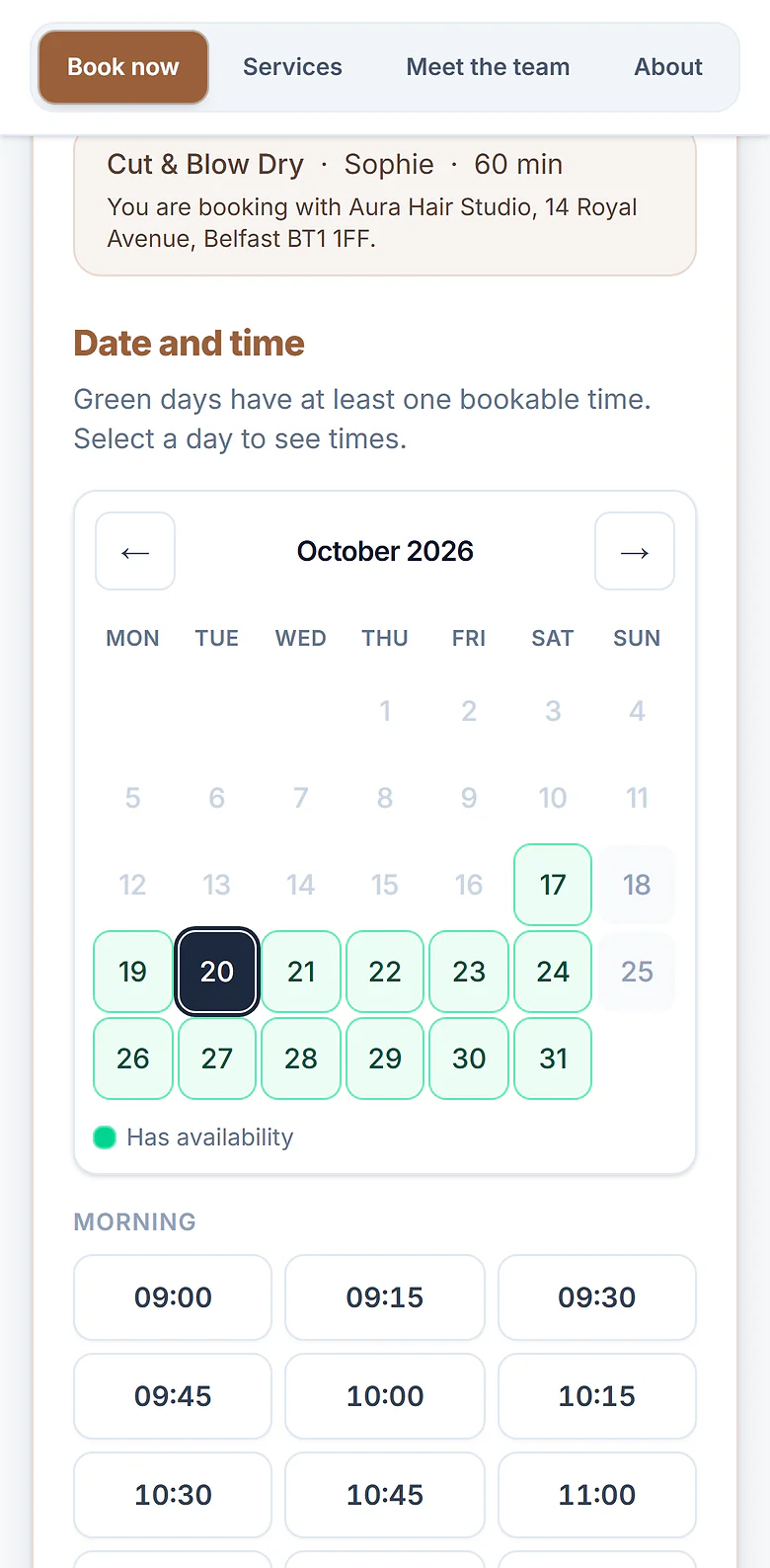
Illustrative example.
The problem
Sharing a space is easy. Sharing a booking system is not.
You want clients to book you as one business. The usual ways of doing that come with a catch.
One shared system makes you look like one employer
One login, one diary and one till, with the owner deciding who is booked when and collecting everyone’s money. HMRC judges employment status on how things work day to day, and that picture points towards employment, whatever the contract says.
Whose clients are they?
On a shared list, everyone’s clients sit in one pot. When someone moves on, working out who owns what is awkward at best, and a falling-out at worst.
One till, one big admin job
Someone takes all the money and pays everyone their share. That is hours of reconciling every week, and one more thing that makes independents look like staff.
Separate apps, scattered clients
Give everyone their own booking app instead and your clients have to find the right person and the right link. There is no one page for the business.
Renting chairs? See how chair rental salon software works on ResNeo, and read what HMRC actually checks in our guide to chair rental and employment status.
The fix
Link. Share. Break. Nothing merges.
Your clients see one business. Each of you still runs your own.
- Step 1
Link.
Your own accounts, joined up
Each of you has your own ResNeo account. Link them and you can see each other's diaries and, if you choose, book clients in with each other.
- Step 2
Share.
One booking page for everyone
Put everyone on one combined page. Clients see one business and book whoever they like. Each booking lands in that person's own diary, and the payment in their own account.
- Step 3
Break.
Leave in a click
Your clients, bookings and takings were always yours, so nothing moves when you go. Your own booking page comes straight back.
Try it
One page. Sophie and Aaron share one combined booking page. Their clients, bookings and payments stay separate.
Joining or leaving swaps the booking page at the top. Watch what stays put underneath.
The Chair Co.
Two independent businesses, one place to book.
Sophie M.
Hair stylist
Aaron R.
Barber
Sophie M.
- Clients
- 312, only theirs
- Bookings
- In their own calendar
- Payments
- Straight to their account
Unchanged either way
Aaron R.
- Clients
- 208, only theirs
- Bookings
- In their own calendar
- Payments
- Straight to their account
Unchanged either way
Linked venues
See each other’s diaries. Book for each other, if you choose.
A link joins two ResNeo accounts. You pick how closely you work together, and the same applies both ways. Most people only need the first level.
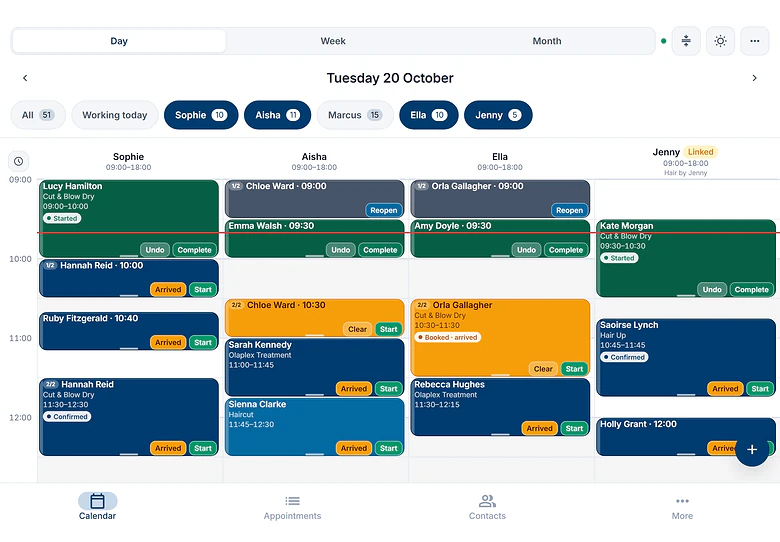
See each other’s diaries. Jenny’s column sits beside the team, marked as linked.
Three levels to choose from
- 1
See each other's diaries
Each of you sees the other's calendar in full, with no client names or contact details, and cannot change anything.
- 2
Manage each other's bookings
Adds client contact details and the right to move or edit bookings that already exist.
- 3
Work as one team
Adds making and cancelling bookings for each other, and each venue sees the other's booking reports (never their takings). This is the only level that can run a combined booking page.
How it works day to day
- Their columns appear in your calendar with a small chip naming their venue
- Where they allow it, a New booking button on their column books straight into their diary
- Every cross-venue action is written to an audit log that both of you can see
- Change what you share, reduce it instantly, or unlink with one click
- Nothing extra to pay, and their calendars never count against your plan
Venue collectives
One booking page. One business, as far as your clients can tell.
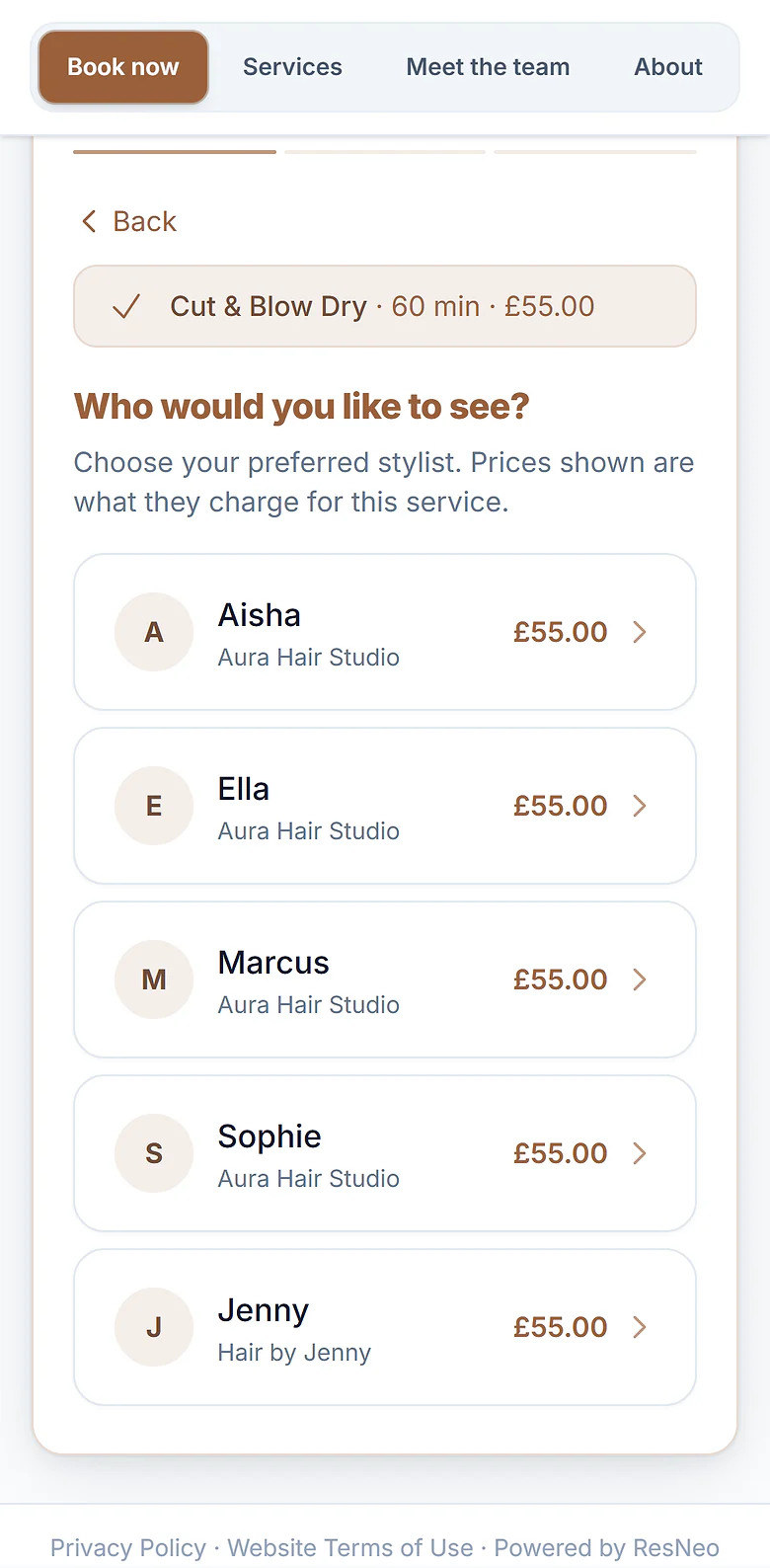
A venue collective puts linked accounts on one public booking page. One of you is the host and runs the menu. Everyone chooses which of their own calendars offer it. A client picks a service and a person, and the booking, the client record and the payment all belong to that person’s venue.
One page, everyone on it. Each person shows under their own business.
Who they are booking with, before they pay. The booking and the payment go to that venue.
The host runs the menu
- Chooses the services on the page
- Sets their prices, deposits, options and forms
- Designs the page and its web address
Every venue keeps its own
- Calendars, working hours and days off
- Client records, notes and history
- Bookings, and payments straight to its own Stripe
Your clients see
- One business, one page, everyone on it
- Who they are booking with, before they pay
- A confirmation from that person's venue
Good to know
- Your own page points to the shared one
- While the page is live and one of your calendars is on it, anyone visiting your own booking page is sent to the combined page. Leave, and your own page is back.
- Only the shared menu is bookable
- Services that are not on the page are parked while you are part of it. Bookings you already have are not touched.
- Move a booking between venues
- Drag a booking onto a calendar at another venue and ResNeo moves it in one step, and tells the client. Bookings with a payment or forms stay where they are.
- Reports name every venue
- Booked revenue shows each venue in its own row, with a column for the part booked through the shared page.
Setting it up
Four steps, and who does each one
There is no shared account. Each of you signs up, pays and gets paid separately. Then one of you links the accounts from the dashboard, in the words you will see on screen.
- 1
Each of you
Sign up for your own account
Sign up separately, each on your own plan with your own free trial, and set up your calendar as usual. Linking and the combined page cost nothing extra.
- 2
One of you, the host
Link with the others and start the page
Open Settings, then Linked Accounts, and click Link with a venue. Find the other person, choose Work as one team, then Also start a collective. Name the page, pick its web address and click Send request.
- 3
The others
Accept and join
Click Review request on the notice in your dashboard, read what joining means, then click Accept and join.
- 4
The host
Choose the services and go live
Click Continue setup on your dashboard. Tick the services for the page and the calendars that offer them. Save, and the page is live.
Managing it
Everything is a button in Settings, then Linked Accounts
Change what you share
Edit permissions on any link. Giving more takes effect once they accept. Reduce access now takes effect straight away.
End a link
Unlink stops access both ways at once. The audit log is kept.
Leave the shared page
Leave on the collective’s row. You keep every service, calendar and booking, and your own page comes back.
Remove a venue or end the page
The host can Remove a venue or End the page. Every venue keeps everything it had.
Hand over hosting
Ask to host on a member’s row. Hosting moves 14 days after they accept, and everyone is told.
Three or more of you?
Every pair needs a link, so each of you links with each of the others. Then the host invites everyone to the page.
A booking system that reflects real independence
HMRC looks at how an arrangement works day to day: who collects the money, whose clients they are, who runs the diary. When everyone shares one login and one till, the system quietly says “one employer”. Link & break says the opposite, because the separation is real.
- Your own account, not a login on someone else's
- Your own client records, notes and history
- Your own working hours, days off and diary
- Payments straight to your own Stripe account, never a shared till
- Leave in a click and take everything with you
Straight talk
It is not a substitute for proper contracts
No booking system settles anyone’s employment status, and we do not claim to. What Link & break does is make sure your booking system reflects genuine independence, instead of working against you if HMRC ever asks questions. On a combined page the host sets the menu and its prices, so keep that in mind alongside your own arrangements.
For what HMRC checks, what reclassification costs, and where to get proper advice, read our guide to chair rental and HMRC employment status.
Nothing extra to pay
Every appointments plan can link. Each of you pays for your own.
Linking and the combined page are part of every appointments plan, Appointments Light included. Each person pays for their own plan and nothing more. A linked venue’s calendars never count against yours. Every plan starts with a 14-day free trial.
Questions
Link & break, answered
What is Link & break?
Link & break is how independents who share a space work together on ResNeo. Each person has their own account. Linking lets two accounts see each other's diaries and, if both agree, book for each other. A venue collective puts linked accounts on one combined booking page. Breaking the link, or leaving the page, takes a click and moves nothing: your clients, bookings and takings were always yours.
Do we all need our own ResNeo account?
Yes. There is no shared account. Each of you signs up, pays for your own plan and gets paid separately. That separation is the whole point: your clients, bookings and money stay in your own account whether you are linked or not.
Does it cost extra?
No. Every appointments plan can link and join a collective, Appointments Light included. Each person pays for their own plan, and linking adds nothing to it. The other venue's calendars do not count against your plan's calendar limit.
Who sets the prices on the combined page?
The host. On a combined booking page, one venue is the host and decides which services are on the page, their prices, deposits, options and forms, for everyone. Each venue chooses which of its own calendars offer those services, and keeps its own hours, clients, bookings and payments. On a plain link with no shared page, everyone keeps their own prices.
Where does the money go?
To the person the client booked with. On the combined page, clients see which venue they are booking with before they pay, and the deposit or payment goes to that venue's own Stripe account. ResNeo never pools money between venues.
What can a linked venue see?
Whatever you agree to. The lowest level shows your calendar with no client names. The middle level adds client contact details and editing existing bookings. The top level, Work as one team, adds making and cancelling bookings for each other, and is what a combined booking page needs. You can reduce access at any time, and every cross-venue action is written to an audit log both of you can see.
What happens when someone leaves?
They click Leave, or Unlink, and that is it. They keep every client, booking, calendar and service, their own booking page comes back, and any services they had parked are bookable again. The others carry on. A combined page needs at least two venues, so it ends when the last member leaves.
Does this sort out our HMRC position?
No booking system can do that, and we do not claim to. HMRC looks at how an arrangement works day to day: who sets prices and hours, who collects the money, whose clients they are, and whether someone can send a substitute. Link & break means your booking system reflects genuine separation, with separate accounts, separate client records and payments straight to each person, instead of working against you. It does not replace proper contracts or advice from a qualified UK tax or employment adviser.
Ready to share a page, not your books?
Each of you starts with your own free trial. Or tell us how your space is set up and we will walk you through it.